
Purpose
The settings on this tab are used to specify what type of files (Generated Outputs) should be produced from the DFA form, and where those file outputs should be sent to (Output Destinations)
Generated Output
This section allows you to generate multipe outputs of the DFA form. These outputs can then be selected and used within the Output Destinations section to determine how and where they are delivered.
Output Types
|
Output Name |
Description |
|---|---|
|
|
Generate a PDF by including or excluding fields from the form to display in a table. |
|
PDF from Html |
Generate a PDF using custom HTML. |
PDF Output Settings
|
Setting Name |
Description |
|---|---|
|
Generated Output Name |
Name for the PDF Output. |
|
Include Uploaded Files |
Append files from upload fields to the output PDF Supported file types: .pdf, .png, .jpg, .jpeg, .bmp, .tiff |
|
Included fields |
Select fields from the drop-down to include in the output PDF. If no fields are specifically included all fields will appear on the generated PDF. |
|
Excluded fields |
Select fields from the drop-down to exclude in the output PDF. |
PDF from HTML Settings
|
Setting Name |
Description |
|---|---|
|
Template |
Select a pre-configured HTML template from the WebApps Platform to use when generating PDFs for this form. If no templates have been configured, the drop-down list will be empty. You can click Edit to open the Admin Templates section, where you can create and manage templates. Templates are useful when you want to maintain a consistent PDF layout across multiple forms. 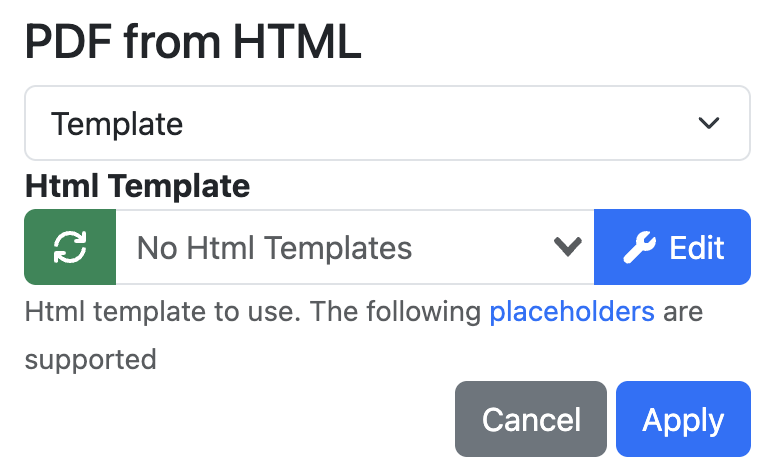
|
|
Custom Content |
Allows you to enter custom HTML directly into the HTML field to define the content and layout of the generated PDF. |
Output Destinations
This section determines where generated form outputs are delivered.
|
Output Name |
Description |
|---|---|
|
API Endpoint |
Outputs form metadata and generated PDF outputs to an external application through a configured API endpoint. |
|
Azure Blob Storage |
Outputs form metadata and generated PDF outputs to Azure Blob Storage location. This option is only suitable for cloud deployments. |
|
Dispatch |
Can be used to dispatch another form using metadata from the submitted form. |
|
|
Outputs form metadata and generated PDF outputs to one or more email recipients. |
|
EzeScan Integration Server |
Can output the form metadata and PDFS to a supported backend system. |
|
EzeScan SERVER |
Outputs form metadata and generated PDF outputs to EzeScan SERVER for additional processing and workflow automation. EzeScan SERVER is a separately licensed product. |
|
File System |
Outputs form metadata and generated PDF outputs to a specified file system location. This option is not suitable for cloud deployments. |
|
Indexing Page |
Outputs form metadata and generated PDF outputs to a configured RIA Indexing Page for further review, indexing, and workflow processing. |
|
Query |
Outputs form processing metadata to a SQL Server or Authority Server database table for reporting purposes. |
Output to Filesystem Settings
Output Directory
Directory to output the files to.
Supports general placeholders.
Supports the following additional DFA specific placeholders:
|
Placeholder |
Value |
|---|---|
|
{{submission["id"]}} |
The GUID of the submitted form. |
|
{{submission["created"]}} |
The DateTime of the submission. ( |
|
{{submission["createdBy"]}} |
The app that created the submission. |
|
{{submission["createdByUser"]}} |
The user that submitted the form. |
Type
|
Output File |
Generated Outputs Tick to enable outputting of the specific generated outputs. Attachments Enable Attachments Enable outputting of attached files Output Name Naming format for attachments. If blank, a unique identifier is used. If no placeholders are found, or duplicate name is found, then a sequential number will be added to the file name. Supports general placeholders. Supports {{session}} placeholder which will get replaced with the submission identifier. Supports {{filename}} placeholder which will get replaced with the original filename. Provide attachment metadata file Attachments will receive a metadata xml file identical to the output format |
|
Metadata |
Include History Includes the items history in the metadata Include Submissions Information Includes the submission information in the metadata |
|
Bundle |
This configuration will export a complete EWB bundle as defined in the EWB Specification |