
The Likert field is used to allow users to answer multiple questions that all have the same answer set.
It is typically used in a form or survey question that measures a person's level of agreement, satisfaction, frequency, importance, or similar attitude on a fixed scale.
For example:
Question:
The software is easy to use.
Likert scale options:
-
Strongly Disagree
-
Disagree
-
Neutral
-
Agree
-
Strongly Agree
Users select the option that best represents their opinion.
Basic Settings
|
Setting |
Description |
|---|---|
|
Name |
The name of the field that is displayed to the user. |
|
Id |
The id of the field that is used for metadata and placeholders. |
Values
The Values of the Likert field are split into two sections, the Answer and Questions.
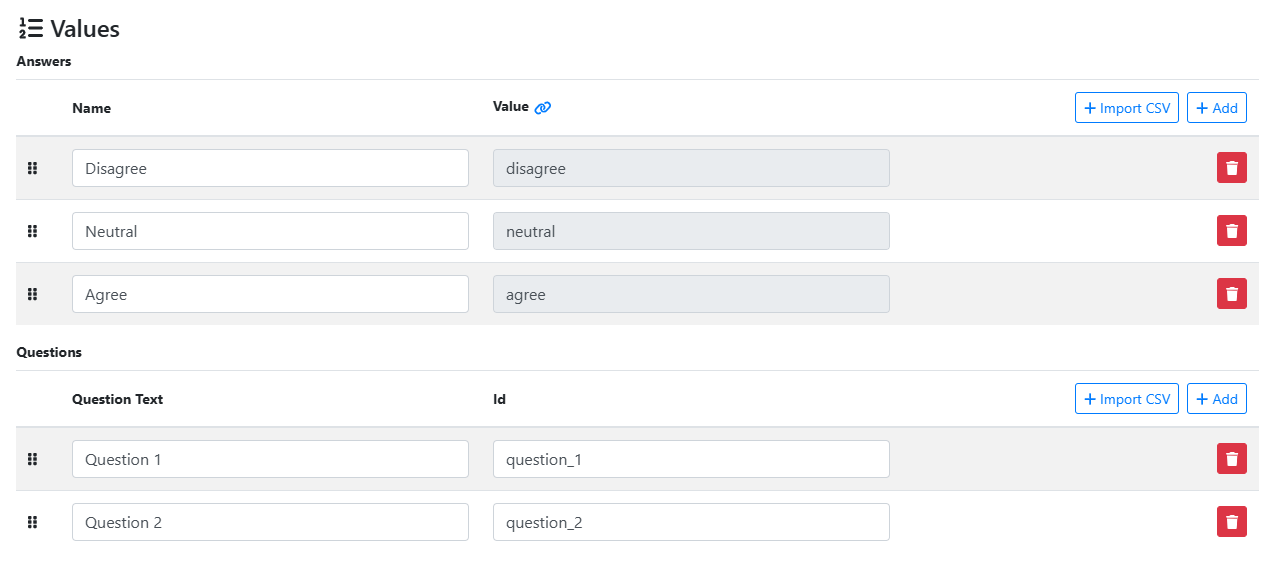
Each question will have all answer listed for it.

Accessing Placeholder Values
To access the metadata values of a Likert field you must used to Prop Metadata placeholder scheme.
{{fields["likert_field_id"] | prop("question_id")}}