
Use these steps to check which version of EzeScan you are currently operating.
Step-by-step guide
Locating the version number
-
Enter the EzeScan Viewer.
-
Select the Help menu then click About.
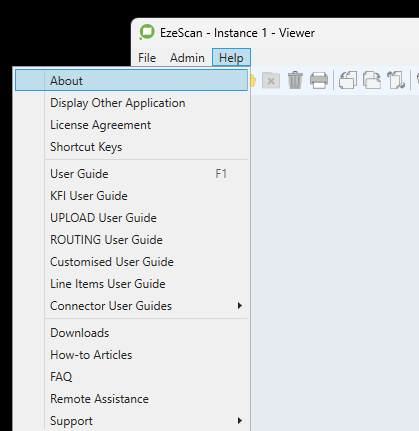
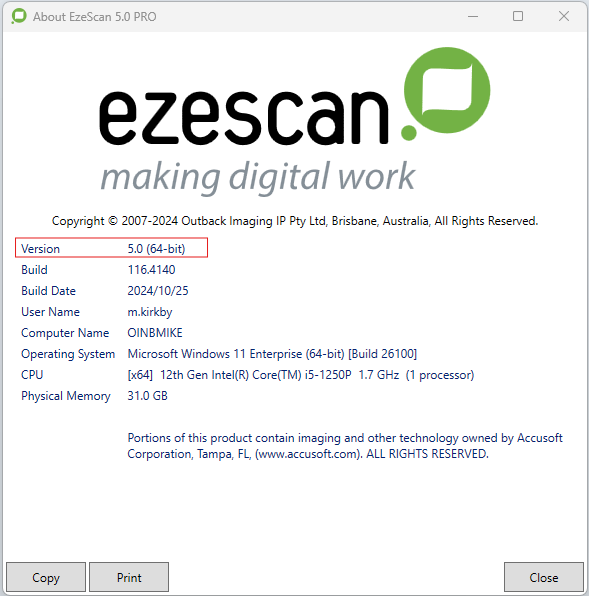
The EzeScan version information will now be displayed. In the example below the major build number is 5, the minor build is 0 (we normally just say 5.0) and it's a 64 bit windows application.
What version information do i need to report when lodging a support ticket?
Support need to know the:
-
The version major number plus the version minor number plus the build major number values (separated by dots)
-
They don't need to know the minor part of the build number.
-
In the example below the version number would be 5.0.116
For support purposes the version number shown above is therefore 5.0.116.
To review the latest EzeScan release notes, click here.
TIP: A login account to the EzeScan website will be required. Please refer to your local EzeScan manager as an account relevant to your organisation may have already been created.