
This connector provides Account Payable, CRM, and Records related functions for Civica Authority Altitude.
Requirements
A login with permissions to the respective modules in Authority.
OAuth Client Id & Secret for authentication with Authority APIs.
The remote IP address of the EWA server to be whitelisted by Civica.
Connection
The connection to Civica Authority Altitude requires a Connector Instance be configured in Admin → Integrations. Use the Add New button to select Civica Authority Altitude from the list of available connectors. Give the instance a name (e.g. Authority PROD) and then fill in the below connection settings.
|
Option |
Description |
|---|---|
|
API Base URL |
The Civica Altitude API base URL (for example, |
|
Client ID |
The Client ID to use for authorisation. |
|
Client Secret |
The Client Secret to use for authorisation. |
|
Username |
Login using this username. |
|
Password |
Login using this password. |
Click the Test button to verify that the application can successfully connect to the server and authenticate your credentials.
Grid Functions
Purchase Order Lines
Fills the grid with lines for the respective creditor and purchase order ids.
|
Option |
Description |
|---|---|
|
Creditor Id |
Filter orders using this creditor id. |
|
Order Ids |
Filter orders using this list of order ids (comma delimited). |
Lookup Functions
GST Codes
Module Parameters
Returns account payable module parameters.
|
Option |
Description |
|---|---|
|
Name Format |
The format to return from this lookup (e.g. |
Parameter Names
-
InvoiceAttachmentType
-
DefaultPostingDate
-
PurchasingCategorisationFlag
-
DisplayBankDetails
-
HeldInvoiceToPostedLinkType
-
LineValueGstOverrideTolerance
-
DefaultRequisitionerId
-
DefaultPosition
Search Functions
The following search actions are available using an Integration Find field.
-
Creditors
-
Invoices
-
Memo Types
-
Purchase Orders
-
Requisitioners
-
Upload Functions
Validation Functions
Duplicate Invoice Check
Fails validation if an invoice number already exists for the same creditor and category, otherwise succeeds.
This can be further restricted so that existing invoices must also exactly match the date and amount to be detected as a duplicate.
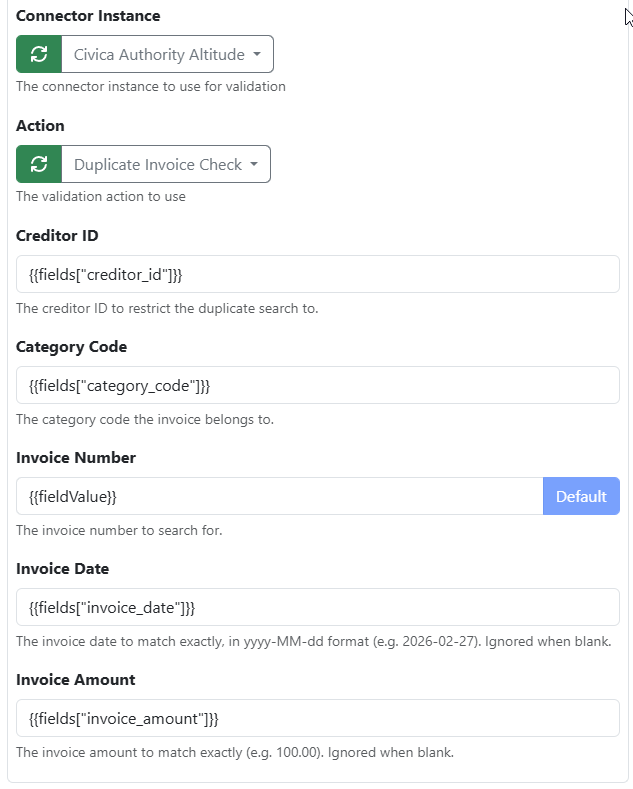
|
Option |
Description |
|---|---|
|
Creditor ID |
The creditor ID to restrict the duplicate search to. |
|
Category Code |
The category code the invoice belongs to. |
|
Invoice Number |
The invoice number to search for. This defaults to the validated field value using placeholder |
|
Invoice Date |
The invoice date to match exactly, in yyyy-MM-dd format (e.g. Leave blank if you do not require duplicate to also match the same date. |
|
Invoice Amount |
The invoice amount to match exactly (e.g. Leave blank if you do not require duplicate to also match the same amount. |
Upload Functions
Purchase Invoice
Posts an accounts payable invoice to Authority.
Built-in Fields
|
Field |
Description |
|---|---|
|
Invoice Type |
Options:
|
|
Creditor |
The ID of the creditor found using the Creditors search function (e.g. |
|
Category Code |
|
|
Site Number |
The site number of the creditor (e.g. |
|
Invoice Description |
Description of the invoice. |
|
Invoice Number |
The invoice reference number. |
|
Purchase Order Id |
The ID of the purchase order found using the Purchase Orders search function. Not applicable to Held Invoice without PO. |
|
Invoice Date |
The invoice issue date formatted as |
|
Invoice Value |
The invoice total . |
|
GST Value |
|
|
Held Status Code |
|
|
Attach Document |
|
|
Payment Date |
|
|
Posted Date |
|
|
Invoice Lines |
|
Requisitioner Fields
|
Field |
Description |
|---|---|
|
Requisitioner Id |
|
|
Requisitioner Position |
|
Memo Fields
|
Field |
Description |
|---|---|
|
Memo Type |
|
|
Memo Text |
|
|
Memo Number |
|
|
Memo Type |
|
Invoice Line Fields
|
Field |
Description |
|---|---|
|
Include |
Use value |
|
Purchase Order Id |
|
|
Purchase Order Line Id |
|
|
Goods Receipt Id |
|
|
Description |
|
|
GST Code |
|
|
GST Value |
|
|
Quantity |
|
|
Price |
|
|
Value |
|
Create Customer Service Request
Creates a new customer service request in Authority’s CRM module.
Built-in Fields
|
Field |
Description |
|---|---|
|
Description |
The description of the request. |
|
Category |
The category id of the request (e.g. The list of options can be retrieved manually from the Authority API endpoint |
|
Customer Contact Method |
The contact method of the request (e.g. EMAIL). The list of options can be retrieved manually from the Authority API endpoint |
|
Requestor |
The ID of the customer making the request in the Name & Address register. |
Populating Custom Fields
The Auto Populate button can be used to generate custom fields for the respective category.
The names are formatted as Item[{Number}] {Label} (for example, Item[6] Street 705). The number prefix is required, however the label can be changed if desired.
The following delimiter ||| can be used pass through multiple values (for example, 45 ||| 87). Spaces will be automatically trimmed from values.